Unreal Engine
Custom Agents & Workflows
Aura ships with eight specialists: Blueprint, VFX, Level Design, Material, Behavior Tree, Audio, Python, and Verification. For anything that doesn't fit one of those, Aura can now build its own: a sub-agent defined on the spot, with its own instructions, its own focus, and its own context.
When a job needs several of them, Aura can wire those calls into a workflow, a graph of sub-tasks that depend on each other or fan out across a list, and run it as a single unit.
ℹ️ Both work in Agent mode. You don't create either one by hand; you describe the job and Aura decides whether a specialist, a custom sub-agent, or a full workflow fits.
Custom Sub-Agents
A custom sub-agent is a worker Aura writes for one job. It gets a narrow brief and only the context it needs, which keeps it focused and keeps your main conversation from filling up with the details of a task you've already delegated.
Examples
- "Run a sub-agent to audit every weapon Blueprint and make sure the damage values match the design doc."
- "Run a sub-agent that reviews my UMG widgets for hardcoded colors and reports what it finds."
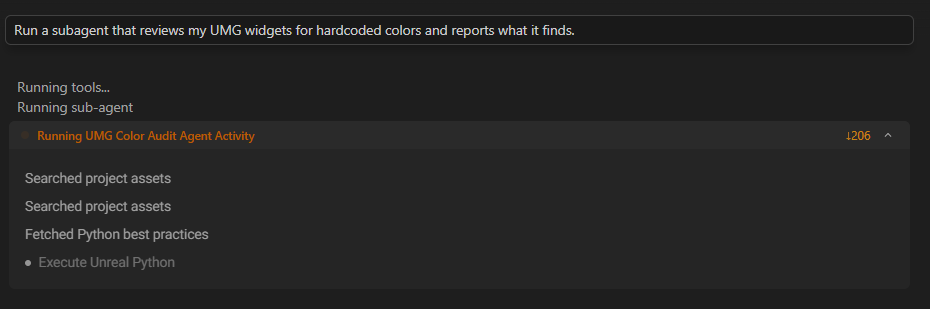
💡 The advantage is context isolation. A sub-agent reading forty Blueprints reports back a summary instead of dumping forty Blueprints into your thread, which keeps the main conversation cheaper and sharper.
Workflows
A workflow is a graph of sub-tasks. Each sub-task is an agent call to a built-in specialist or a custom sub-agent, and sub-tasks can depend on earlier ones, so a later step gets the output of the one before it. A sub-task can also fan out across a list, running the same step over many items.
Aura authors the graph and runs it as one unit. You don't write the graph yourself.
Examples
- "Run a workflow that finds all blueprints with a point light component and disables shadow casting on all of them."
- "Run a workflow that in parallel creates a Niagara fire VFX, a fire sound cue, and a basic projectile Blueprint, then wires all three together in one final step."
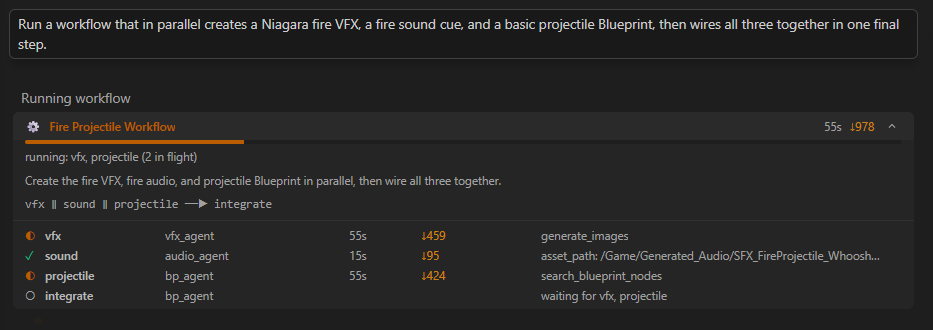
💡 Say "as a workflow" when speed matters. Aura works on the parts of your task in parallel and combines the results without you coordinating anything.
Workflow Tips
- Describe the shape of the work, not the graph. "Do this for each of the six levels" is enough for Aura to build a fan-out. You don't need to specify sub-tasks or dependencies.
- Name the checkpoint. If a step must finish before the next begins, say so. "Generate the mesh, then retexture it" reads as a dependency; listing both in one sentence may not.
- Keep sub-agent jobs narrow. The value is a tight brief. "Review this system" gives a sub-agent far less to work with than "check every ability in this folder for a missing cooldown."
- Watch the activity panel. Each running agent appears under its own name. If a run is taking a while, that's where you see which step it's on.
Current Limitations
We're actively working on custom agents and workflows. They'll only get better from here!
A single workflow is capped at 10 sub-tasks, with at most 4 running at once. A single workflow can run for up to 35 minutes.