
Documentation

Editor Agent (Unreal Python)
Aura can perform complex, multi-step actions across the editor using Unreal python. Aura can batch edit actors/components in your current level, detect unused project assets, identify naming convention issues and more.
💡 This is one of the most powerful tools in Aura’s repertoire. Be sure to review scripts before running them and save/backup your project regularly.
The crash course below covers Editor Agent.

Batch Edit Actors In Level
-
Batch property edits: “Find all the health pickups in this level that restore 50 HP or more and set them to 25 HP instead. Print the list of all the pickups you changed!”
-
Batch renaming: “Find all the shooting targets in this level and rename them to include their quadrant.”
-
Tag editing: “Add the ‘Collectible’ tag to the currently selected pickups in level”
-
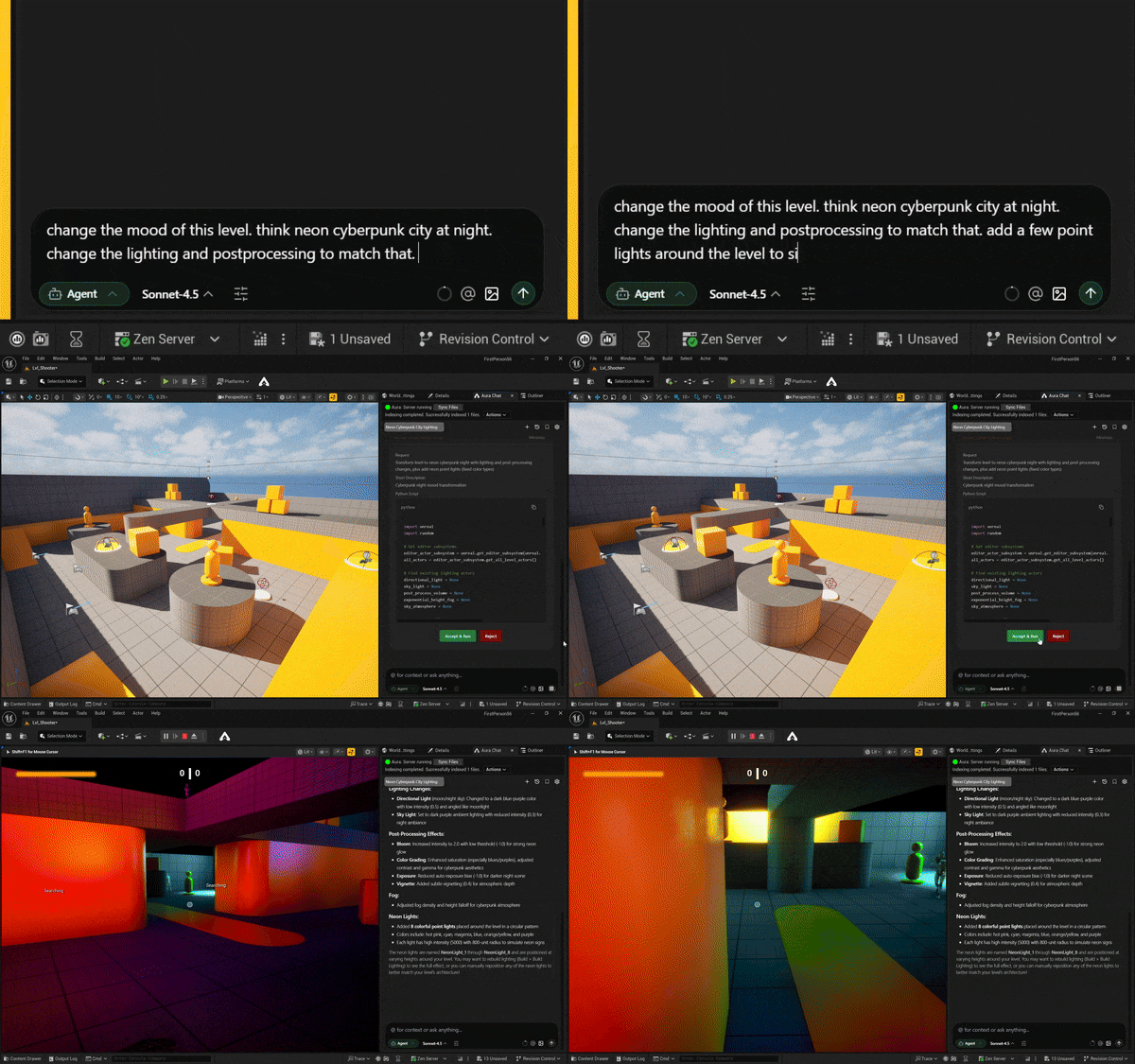
Batch place and edit actors in level: “Change the mood of this level. Think neon cyberpunk city at night. Change the lighting and postprocessing to match that. Add a few point lights around the level to simulate neon signs too”
Identify Issues
-
Missing tags: “Check all the enemies in this level and make sure they have the Enemy tag.”
-
Batch rename files to follow naming conventions: “Use the asset registry to find all my enum assets and make sure they fit the naming convention E_{EnumName}Enum. Print the list of all enums you changed!”
-
Find unused assets: “Detect unused assets for me.”
Handle Quick Edits
Aura can also handle simple and quick edits so you’re free to move onto other things.
-
Edit properties: “Change the player’s starting weapon to a rocket launcher.”
-
Export to csv: “Can you export my DT_Attributes to a csv file and print its full path to chat?”
⚠️ Python is a powerful tool so be specific when asking it to make asset changes. Things like mass-renaming assets can have consequences if a script ends up accidentally accessing internal Engine content.
Example Workflow
This above are common use cases, but the possibilities are endless! Here’s an example workflow combining agentic editor actions with other Aura features:
-
Ask Aura to generate a model for a jump pad for a platforming obstacle course.
-
While that’s running, start another thread and ask Aura to create a blueprint for a simple jump pad called BP_JumpPad
-
Place one in level and test. Tweak the launch force to your liking.
-
Ask Aura to place jump pads across the obstacle course. Playtest and adjust jump pad locations as needed.
-
Once the 3D model is done importing, ask Aura to swap in the new mesh and material to BP_JumpPad.