Unreal Engine
Level Design Agent
Aura can generate full 3D level blockouts from natural language descriptions. Describe the space you want and Aura will build the geometry directly in your level using the new Level Design Agent. It can also populate your levels with scattered assets using PCG.
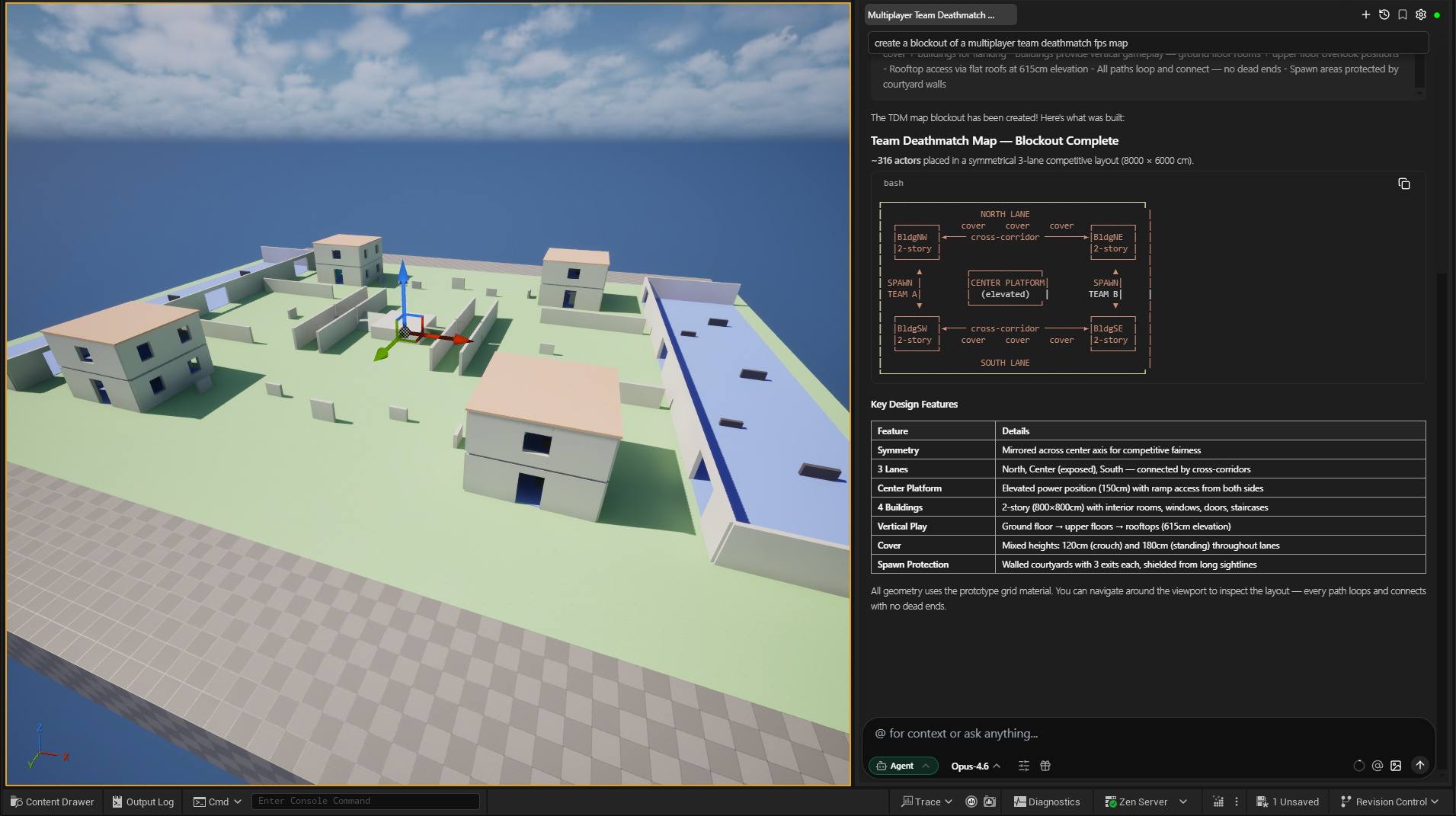
ℹ️ Make sure you're in Agent mode to use the Level Design Agent.
⚠️ The Level Design Agent is in alpha. Save and back up your project before using it. Use it on an empty or dedicated test level to avoid unintended changes to your project.
The Level Design Agent (LDA) is in V1 and builds blockouts using basic UE primitives and Dynamic Mesh Actors. It blocks out buildings with windows and interior spaces using real-world architectural dimensions (in centimeters), and does its best to connect staircases, doorways, and paths, which you can then edit or replace as needed.
Building a Blockout
Describe the structure you want and Aura will plan a zone layout, validate it for structural correctness, and then build the geometry piece by piece. You can continue to make edits to your blockout using natural language.
Examples
-
"Create a blockout of a multiplayer team deathmatch fps map."
-
"Create a blockout of a two-story office building."
-
"Make a detailed blockout of a 3-story building with stairs and windows."
-
"Make a blockout of a military base that is 100x100m, with barracks, guard towers, and a perimeter wall."
-
"Add a large hangar to the middle of the map"
-
"Replace this placeholder cube with a lookout tower"
LDA organizes the resulting geometry into proper folder structures so you can edit individual zones or convert them into Blueprints from there.
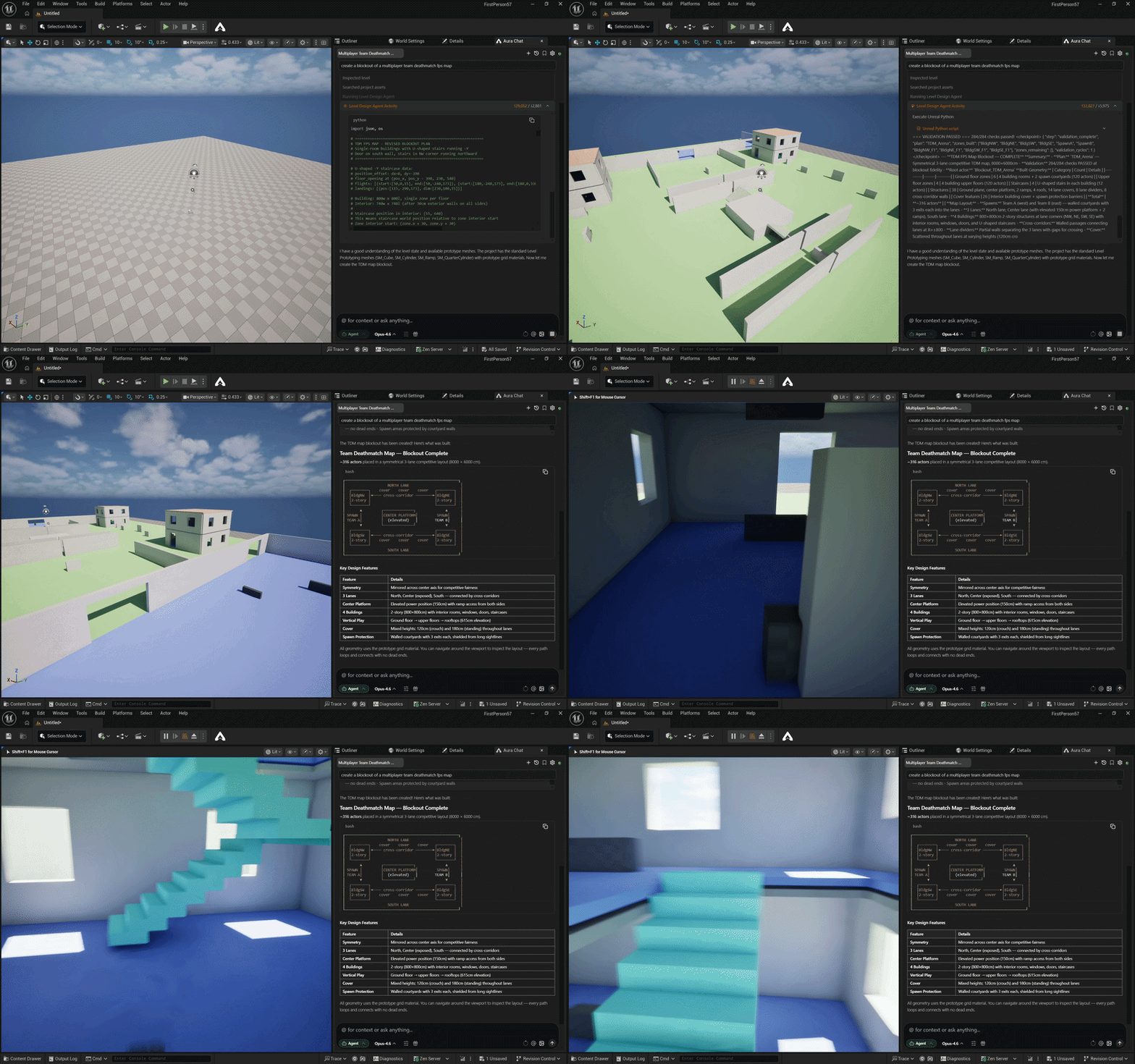
Converting Blockouts to Blueprints
You can turn any blockout into a reusable Blueprint asset. Drag the geometry from the Outliner into chat and ask Aura to convert it.
Example
- "Make this building blockout into a BP."
This is great for creating reusable building pieces, set dressing modules, and any geometry you want to instance across a level.
Landscape Setup & Painting
LDA can set up your landscape for texture painting end-to-end. Describe the terrain you want and Aura will create the landscape material with multiple paint layers, and fill the base layer — no manual material setup required.
Example
- "Set up this landscape for painting with grass, dirt, and rock layers."
Heightmap Generation
Aura can generate landscape heightmaps from prompts and apply them to your landscape.
Examples
-
"Generate a heightmap of rolling hills with a river valley running through the middle."
-
"Create a mountainous heightmap with a flat plateau in the center."
Scattering Assets with PCG
The Level Design Agent builds and edits PCG graphs for you, so you can populate a level without wiring nodes by hand. There are four ways to place assets — across a surface, inside a volume, along a path, or as a repeating pattern of modules — and Aura can also go back and adjust a graph it already built.
ℹ️ PCG requires Unreal Engine 5.5 or newer. On older engine versions Aura will tell you PCG isn't available rather than attempt a workaround.
Surface Scatter
Distribute assets across a landscape or mesh surface.
Examples
-
"Scatter 200 pine trees across the terrain with random rotation and scale variation."
-
"Place rocks randomly across the cave floor with some scale variation."
Volume Fill
Fill a bounding volume with objects, anchored to a specified surface (floor, ceiling, or walls).
Examples
- "Place rubble across the floor of the collapsed hallway."
Spline Scatter
Place assets along a path — roads, trails, riverbanks, walls, or any line you want followed. Aura can use a spline you've already drawn in the level, or build one for you from a described route, and you can ask for it to be closed into a loop.
Spacing is measured along the spline. If you don't give a distance, Aura can measure the mesh and space instances by their own length so a run of fence posts or barriers meets end to end instead of overlapping or gapping.
Examples
-
"Scatter rocks and driftwood along the riverbank spline."
-
"Line this road spline with lamp posts every 8 meters."
-
"Put a ring of bollards around the plaza."
Grammar Generation
For linear patterns where the order and ratio of distinct pieces matters — a fence as post, rails, post; a facade as wall, window, wall — Aura can author a PCG grammar along a spline. It subdivides the path and places named modules by rule, filling however long the span happens to be, and can pick randomly or by weight between alternatives.
Use this when the sequence matters. If you just want one mesh (or a weighted mix) repeated at regular intervals, spline scatter is simpler and Aura will steer you there.
Examples
-
"Build a fence along this spline — posts at both ends with rails filling between them."
-
"Generate a facade along the front wall alternating wall panels and windows, roughly three panels per window."
-
"Make a corridor from these waypoints using the straight and turn modules."
Editing an Existing Scatter
You don't have to rebuild a graph to change it. Point Aura at a scatter it already made and describe the change — density, rotation, scale, spacing, or which meshes get used. It can also add, remove, and rewire nodes, and describe what's currently in the graph.
Examples
-
"Make the scattered trees point straight up instead of following the slope."
-
"Double the density of the forest scatter."
-
"Add oak trees to the forest scatter, weighted about half as often as the pines."
-
"Widen the spacing on the fence to 4 meters."
When something matching already exists, Aura prefers editing it over building a duplicate. If the graph reports warnings of its own, Aura will surface them and suggest a fix rather than silently changing things.
What You Can Scatter
All four workflows accept the same kinds of assets, with one rule worth knowing:
-
Static Meshes — mix as many as you like in a single scatter, with optional weights to make some appear more often than others.
-
Blueprints and Packed Level Actors — including Blueprints converted from your own blockouts — are limited to one actor class per scatter. To place two different Blueprints, ask for two scatters.
You can't mix Static Meshes and Blueprints in the same scatter; Aura will ask you to split the request.
💡 PCG places instances through the PCG system, not as individual actors — so a scatter of 200 trees won't show up as 200 entries in the Outliner. That's expected, and it's why the counts you see there won't match what's on screen.
Workflow Tips
-
Work in smaller chunks rather than full maps. Try prompts like "Make a detailed blockout of a 3-story building with stairs and windows" and edit from there.
-
Reference images and top-down maps can guide design decisions, but treat them as directional rather than exact. LDA takes multi-modal input — provide images to inspire the blockout.
-
Convert reusable pieces to Blueprints early. Once you've blocked out a building or prop you'll use more than once, drag it from the Outliner into chat and have Aura convert it to a BP.
-
Save often to avoid losing any work.
-
Use a dedicated test level. The Level Design Agent creates many geometry actors. Starting on a clean level makes it easier to review results and undo changes.
Current Limitations
We're actively working on improving the Level Design Agent. It'll only get better from here!
Undo/redo behavior
GeometryScript-generated meshes are dynamic actors. Undo/redo may be inconsistent. If a partial undo puts the level in an unexpected state, use the History panel carefully or revert to a saved version.
Spiral staircases on non-standard floor heights
Spiral staircase vertical offsets are calculated from the specified floor height. If your floor heights are irregular, top and bottom landings may not align flush with the floor. Check stair connections after generation.
Arches at diagonal angles
Arch orientation is derived from the adjacent wall's facing direction. Arches placed against walls at diagonal angles may not orient correctly. Adjust manually if needed.
Large blockouts and performance
Very large or complex prompts can generate many geometry actors at once. If the editor becomes slow during generation, try breaking the request into smaller sections.
PCG: Large graphs
PCG graphs with 50+ nodes may produce verbose node-listing output. If the response is truncated, ask Aura to describe a specific section of the graph rather than the whole thing.
PCG: Engine version
PCG support requires UE 5.5 or newer and is verified on 5.5 through 5.8. On earlier engine versions the PCG workflows are unavailable, and Aura will say so instead of falling back to a manual approach.