Start here
Release Notes
Opus 5.5 support
UnrealUnity
We've just pushed out support for Opus 5.5.
Relaunch your Aura client and you should see it available now in your model selector 🔥
v1.0.6
UnrealUnity
Aura for Unreal v1.0.6 Hotfix
Get the latest installer from your account at https://tryaura.dev/, or use the update option inside Aura.
v1.0.6 Hotfix
- Fixed “Item was provided without required ‘reasoning’ item” issue stopping threads.
- Fixed “Network error” issue stopping threads.
- Fixed infrequent crash when saving large assets.
- Fixed subagent activity not updating correctly if thread not in focus.
Unity
- Added option to install official Unity skills into your project which will improve accuracy of Aura
v1.0.5 Unreal
Unreal
Aura for Unreal v1.0.5 Hotfix
This hotfix focuses on stability and reliability improvements, including many fixes based on feedback from our beta testers.
Get the latest installer from your account at https://tryaura.dev/, or use the update option inside Aura.
Improved Reliability
- Image generation and editing have moved to a newer model with faster generation times and real transparency support, improving VFX particle textures and level color-blocking.
- The mode tutorial popup no longer reappears after you dismiss it.
- Fixed long Aura chats failing to automatically continue after tool calls complete.
- Fixed stopping a response sometimes causing invalid reasoning part errors.
- Verification Agent video recording no longer crashes the editor on some GPU and driver combinations.
- Fixed the same assistant response displaying multiple times.
- Fixed python script preview cards sometimes displaying empty.
- Aura now recognizes unwired and disabled Blueprint nodes more reliably.
- Fixed a stray null character in a tool result causing the assistant response to be rejected.
- Web search citation placeholders no longer leak into chat text.
- Fixed Unreal connection status displaying out of date information and being inconsistent between main chat and settings pages.
- Increased workflow size limits allowing for longer agentic generations.
- Fixed download update button sometimes not displaying while forced update dialog is covering the screen.
- Completion toasts sometimes were displaying an incorrect thread name.
- Press Escape now closes the full-size image preview.
v1.0.0
UnrealUnity
Aura 1.0 is out now for Unreal Engine and Unity! 🚀
After seven months in public beta, we’re excited to share this milestone with you. Your projects, feedback, and bug reports helped shape 1.0. Thank you for building with us.
Aura 1.0 is here, and it arrives on two new platforms. Aura is now on Mac for both Unreal and Unity. Aura is also coming to Fab today, with source access and support for custom Unreal Engine builds. Aura now has one-click Codex integration. We’ve introduced GPT-6 Astra on Pro and Ultimate plans. Plus a large number of reliability fixes, making 1.0 the best Aura experience yet.
IRONMACE, the studio behind Dark and Darker with over 20 million players, used Aura to build their tutorial in half the time. Read the interview → https://80.lv/articles/how-dark-and-darker-s-devs-used-aura-to-build-a-major-feature-in-half-the-time
We also worked with Anthropic’s Applied AI engineers to improve how Aura playtests games and verifies its own work in the editor.
Read the full Aura 1.0 announcement → https://www.tryaura.dev/updates/aura-1-0-launches-today/
Aura on MacOS
- Native Mac client: Aura's desktop app now runs on macOS. Mac download buttons are available on the download page and after signup, alongside the Windows builds.
- Same Aura, same account: Your cloud-synced threads and project memory follow you between Windows and Mac, so you can pick up a conversation on either machine.
Codex + GPT-6 Astra
- One-click integration for Codex is now in Settings > MCP Configuration.
- GPT-6 Astra is available on Pro and Ultimate tiers.
Aura on Fab
- Coming later Today: Aura will be installable directly from the Fab store on every supported engine version, 5.4 through 5.8.
- Source access and custom Unreal Engine builds: The Fab edition ships the plugin's C++ source, so you can build it yourself with custom-modified versions of Unreal Engine.
Faster and More Reliable
- Faster responses: We took the Auto mode classifier and several serial backend lookups off the critical path, so every turn starts streaming sooner., and responses are snappier
- Fixed a bug where Aura could take over your PIE instance
- Improved Crash recovery stability
- Fixed issues that could cause messages to disappear, duplicate, or get stuck when stopping, editing, resending, or starting a new conversation.
- Simulated key and gamepad input now reports when nothing in the project is bound to it, instead of claiming success on a motionless pawn. The verification agent can also run inside dynamic workflows.
- Improved image attachment UX and responsiveness
- Aura no longer occasionally wipes out issues
- Model generation waits for PIE: Generated 3D models imported while Play In Editor was active came out as empty meshes with broken materials. Imports now wait until the play session ends.
- Improved UX around toolcalling
- Improved Blueprint Stability
v0.15.9 Unreal
Unreal
Aura for Unreal v15.9 Hotfix
Aura 15.9 is a maintenance release that lays the groundwork for our next major release. Most of the changes are behind the scenes, but also contains some general stability improvements.
Get the latest installer from your account at https://tryaura.dev/, or use the update option inside Aura.
v15.9 Hotfix
- Stability improvements: General reliability fixes across the plugin and web app.
v0.15.8 Unity
Unity
Aura for Unity v15.8 is now also available
Get the latest installer from your account at https://tryaura.dev/, or use the update option inside Aura.
v0.15.8 Unreal
Unreal
Aura for Unreal v15.8 Hotfix
Aura 15.8 Hotfix makes getting started easier with Sign in with Google.
Get the latest installer from your account at https://tryaura.dev/, or use the update option inside Aura.
v15.8 Hotfix
- Sign in with Google Option. Create an account or sign in with your Google account on the website and in the Aura desktop app, no password required.
v0.15.7 Unity
Unity
Aura For Unity v0.15.7
Everything in the Unreal v0.15.7 release lands in Aura for Unity too. This update brings Custom Subagents and Dynamic Workflows to Unity, adds screenshot-based verification so Aura can check its own work in your scene, and carries over the stability fixes for long chats, reopened tabs, and mid-response errors.
Get the latest installer from your account at https://tryaura.dev/, or use the update option inside Aura.
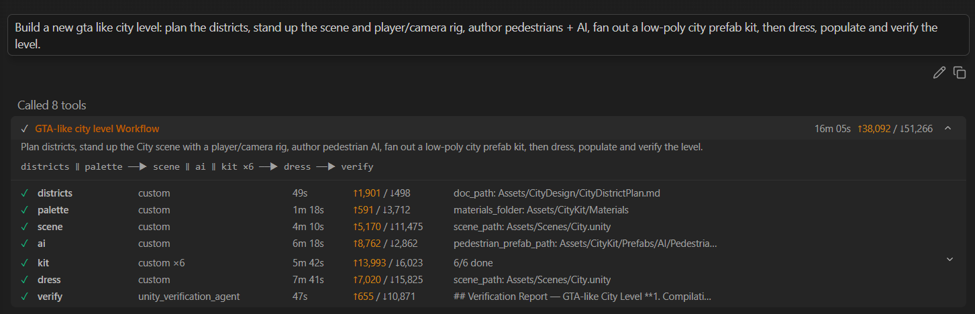
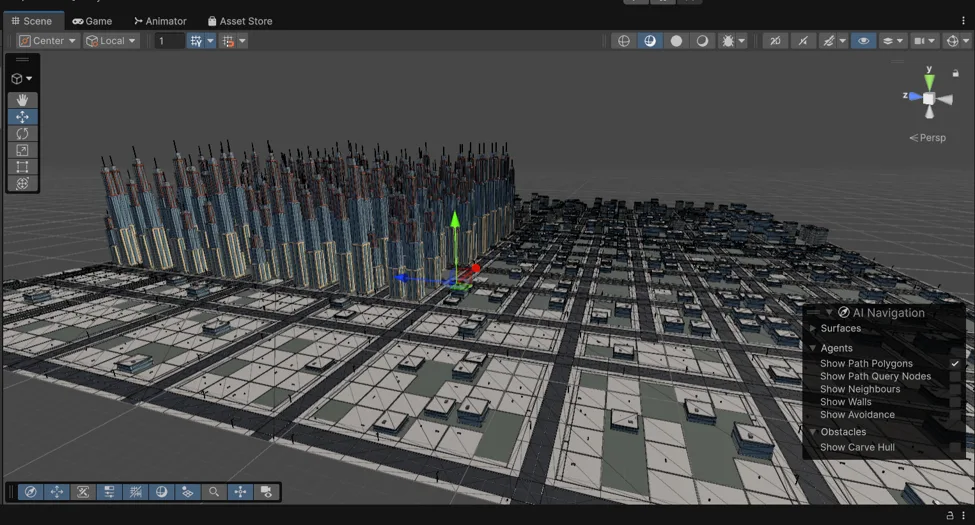
Now in Aura for Unity
- Custom sub-agents — Aura can define a bespoke sub-agent on the spot with its own instructions, focus, and context, instead of being limited to the built-in specialists. The activity panel is titled with the name Aura gave it, so you can monitor progress.
- Workflows — Aura can author a job graph of sub-agent calls (steps that depend on each other, steps that fan out over a list) and run the whole thing as one unit. Workflows run on every model.
- Verification in Unity — Aura can now verify the results of a completed task by taking screenshots and checking them against what you asked for, so it confirms its own work instead of guessing.
- Upgraded model generation — "V3" now refers to the latest high-quality model. Ask for "high quality" to use it, or select it in Chat Options. Defaults are unchanged: game-ready models at up to 20k triangles, unless you ask for a higher triangle count.
Stability Improvements
- Long conversations and summaries are more dependable — fewer big chats getting stuck, especially around summarization.
- Hitting an error mid-response no longer risks bricking the thread.
- Aura is less likely to treat an old summary like a new request, so conversations stay on track.
- Better at finding the right tool for the job — features like image generation are less likely to be incorrectly marked as unavailable.
- Reopening a closed tab works again instead of wedging the thread on its next send.
- Fixed renaming threads so conversation titles can be updated normally.
- Bigger paste window with a minimum size, so pasted text isn't crammed into a sliver.
v0.15.7 Unreal
Unreal
Aura For Unreal v0.15.7 - Reliably Fully Self-Driving
On top of the eight specialist agents, Aura now supports Custom Subagents and Dynamic Workflows. Ask aura to spin up parallel sub-agents for whatever your task actually needs by asking it to create a workflow. Verification is getting a big boost in capability and accuracy, and Blueprint generation is 2X faster and more reliable.
This release also makes Aura more dependable. Long chats, reopened tabs, and mid-response errors are much less likely to leave you stuck or force you to start over. Blueprints generate 2X faster on average, and reliability has increased. The verification agent’s accuracy has also gotten a huge upgrade, and it’s more capable than ever of testing your game.
Get the latest installer from your account at https://tryaura.dev/, or use the update option inside Aura.
Aura Builds Its Own Team
- Custom sub-agents: Aura can now define a bespoke sub-agent on the spot, its own instructions, its own focus, its own context, instead of being limited to the eight built-in specialists. The activity panel is titled with the name Aura gave it, so you can monitor progress.
- Workflows: Aura can author a job graph of sub-agent calls, steps that depend on each other, steps that fan out over a list, and run the whole thing as one unit. Workflows run on every model.
Better Blueprints
- Blueprint Generation speed has been doubled with no loss in accuracy
- BP Agent can now research blueprints in larger batches reducing token cost and waste.
Verification Agent Accuracy
- The Agent can now modify your world state to pass more cases
- Increased research capability and depth — VAgent now researches your project and can verify up to 12 cases in one call with the same degree of Accuracy
- Batched tool-calling and parallelization increase model speed and performance.
Upgraded Model and Image Tools
- Art Direction (Technical Preview) — tag folders of reference images and attach the matching ones to your prompts. Your curated art direction images are readily available across chat threads and the edit image modal. Enable under Settings → Chat Options.
- Upgraded model generation: "V3" now refers to the latest high-quality model. Ask for "high quality" to use it, or select it in Chat Options. Defaults are unchanged: game-ready models at up to 20k triangles, unless you ask for a higher triangle count.
- Improved level design geometry: porches, entrance steps, ramps, and staircases now build with correct orientation and alignment.
Stability Improvements
- Long conversations and summaries are more dependable. We fixed several bugs that could make big chats get stuck, especially around summarization, so you are much less likely to lose momentum or need to start over.
- Hitting an error no longer risks bricking the thread. A failure in the middle of a response could leave the conversation stuck, and that recovery path has been fixed.
- Summaries are safer and less distracting. Aura is less likely to treat an old summary like a new request, so conversations stay on track.
- Aura is better at finding the right tool for the job. Features like image generation are less likely to be incorrectly marked as unavailable, so you can keep working without restarting the conversation.
- Behavior Trees: Aura can now process larger Behavior Tree graphs more reliably.
- Reopening a closed tab works. Re-opening a thread you'd closed could wedge it permanently on its next send.
- Fixed renaming threads so conversation titles can be updated normally again.
- FAB search thumbnails are back in chat results, as a clickable card strip, display-only, so no extra tokens or latency, and old threads render them retroactively.
- Bigger paste window with a minimum size, so pasted text isn't crammed into a sliver.
v0.15.6 Unity
Unity
Aura for Unity v0.15.6
Aura now remembers. With Cloud Storage, Aura carries the important details of your work between every thread and across devices, and Project Memory keeps your project's conventions and decisions in mind from one conversation to the next. Auto mode is also more capable and accurate this release — expect Aura to just feel better all around.
Get the latest installer from your account at https://tryaura.dev/, or use the update option inside Aura.
v0.15.6 Highlights
- Cloud Synced. Your chat history now follows your project in the cloud, so you can pick up the same conversation from any device. Conversations are organized by project, so switching projects shows only the relevant threads.
- On login you'll be prompted to import your local conversations into cloud sync and associate them with your current Unity project. Click "Not now" to defer — you can re-run it later from Aura Settings > Unity Project > "Sync local conversations".
- Project Memory. Aura remembers your project's conventions, structure, and the decisions you've made, and brings them into new conversations automatically.
- Better Accuracy. Expect a significant boost in accuracy when using Auto mode.
- Web search. Aura can now search the web natively on supported models (availability depends on the model you choose).
- Cleaner Interface. We restyled the UI throughout Aura, added helpful examples to the new chat screen, improved long-conversation controls, made pinned context safer, cleaned up notifications, and improved readability throughout.
Under the Hood
- Smarter model selection. Auto mode now classifies task difficulty and routes to the right premium model (Opus 5 and others) automatically.
- Continued stability improvements for long and image-heavy conversations — more resilient summarization and safer handling of long, multi-step turns.
Server-side fixes
UnrealUnity
We've pushed out backend fixes for a few issues:
- Fixed thread summarization sometimes failing
- Fixed some models failing to see image contents
You may need to start a new thread if you had an old one that had gotten stuck summarizing.
v0.15.6 Unreal
Unreal
Aura for Unreal v0.15.6 - Refined Awareness
Aura’s verification agent has been improved significantly and is more capable of building and testing it’s own features. Accordingly, Plan mode’s verification step is now automated. Just type in the feature and sit back and let Aura or Claude Code do the driving.
Aura’s Auto mode is also now more capable and accurate: expect Aura to just feel better all around.
With Cloud Storage Aura now seamlessly remembers important details about your work with it between all your threads and across devices; You don’t have to worry about keeping everything in one giant conversation anymore, or on one computer.
Get the latest installer from your account at https://tryaura.dev/, or use the update option inside Aura
A More Seamless Aura
- Cloud Synced: Your chat history now follows your project in the cloud, so you can pick up the same conversation from any device.
- Chat history is organized by project now, so when you switch projects only relevant conversations will be shown.
- What happens to conversations from older versions of Aura?
- On login you’ll be prompted to import local conversations into the new cloud sync system and associate them with your current open Unreal project.
- If you click "Not now", you can revisit the option in Aura Settings > Unreal Project >”Sync local conversations”.
- Note image previews may not carry over if they’re stored locally in the Saved folder. We’re working on improving this in the future.
- Project Memory: Aura seamlessly remembers your project’s conventions, structure, the decisions you've made and brings them into new conversations.
- 4X Faster Verification Agent: Verifications runs are much quicker allowing Aura to verify its own work more seamessly
- Better Accuracy: You can expect a significant boost in accuracy when using Auto mode.
- Cleaner Interface: We restyled the UI throughout Aura, added helpful examples to the new chat screen, improved long-conversation controls, made pinned context safer, cleaned up notifications, and improved readability throughout.
Better Reliability
- Collapsed Blueprint graphs are now supported. Aura can now read and edit collapsed nodes, a long-standing gap for anyone who keeps their Blueprints tidy.
- Verification Agent video evidence is more consistent from run to run. We also fixed the stalling after a verification plan was posted. From plan mode, verification steps will now execute when you hit “Build”.
- Material Functions and Parameter Collections. Aura can create and wire up shared material parameters and material functions, on every supported engine version.
- Normal maps are now derived from albedo data via local algorithm instead of image generation.
- Decal materials create, compile, and render correctly across 5.3–5.8.
- Web search available on new models.
v0.15.5 Unity
Unity
Aura for Unity v15.5 is now available too!
Unity catches up in this release, picking up the latest premium models, faster server-driven model rollouts, and a wave of stability fixes that keep long conversations and large edits from getting stuck.
Get the latest installer from your account at https://tryaura.dev/, or use the update option inside Aura.
v15.5 Highlights
- New premium models: Grok 4.5, Kimi K3, and Opus 5. Aura now supports Grok 4.5, Kimi K3, and Opus 5 as model options, expanding your choices for complex Unity Engine tasks.
- Server-driven model picker. Model availability is now controlled on the server, so we can roll out the latest models faster — no plugin update required.
Stability Fixes
- Fixed threads getting stuck on the "thinking blocks cannot be modified" error.
- Fixed Opus 5 sometimes getting stuck or producing truncated output on long responses and large code edits.
- Fixed threads failing to summarize on long conversations and image-heavy chats, reducing repeated "Failed to connect to server" errors during compaction.
v0.15.5 Unreal
Unreal
Aura for Unreal v15.5 Hotfix
v0.15.5 is a stability hotfix, addressing threads getting stuck with the “thinking blocks cannot be modified” error, preventing silent truncation on long responses and large code edits, and reducing repeated “Failed to connect to server” errors when Aura compacts a big conversation.
Get the latest installer from your account at https://tryaura.dev/, or use the update option inside Aura.
v15.5 Hotfix
- Fixed threads getting stuck on “thinking blocks cannot be modified” error.
- Fixed Opus 5 sometimes getting stuck or have truncated output.
- Fixed threads failing to summarize on long conversations and image-heavy chats.
v0.15.4 Unreal
Unreal
Aura for Unreal v15.4: It Checks Its Own Work.
Aura 15.4 teaches the assistant to verify what it builds by actually playing your game. Aura now spins up Play-In-Editor, records video of the result, reads live gameplay state, and reports back with evidence. If the editor crashes mid-task, Aura can detect it, diagnose the cause, relaunch the full editor, and keep going, so "done" means shown working, not just written, and crashes do not have to derail the task. This release also adds a wave of new agent capabilities across level design and materials.
Get the latest installer from your account at https://tryaura.dev/, or use the update option inside Aura.
v15.4 Highlights
- Verification Agent V2: Aura now proves changes work by automatically launching Play-In-Editor to run your feature, checking real gameplay/UI state (actors, GAS, UMG), retrying fixes when something’s off, and attaching clear evidence (including recorded video and multiplayer checks), so you spend less time manually validating and get to “done” faster with confidence.
- Autonomous crash recovery. If the editor crashes mid-task, Aura can detect it, diagnose the cause, and relaunch the full editor to keep going, gated behind a new "Automatically recover from editor crashes" setting.
- Server-driven model picker. Model availability is now controlled on the server, so we can roll out the latest models faster, no plugin update required.
- Kimi K3 and Opus 5 support. Aura now supports Kimi K3 and Opus 5 as available model options, expanding the assistant's model coverage.
New Agent Capabilities
- PCG spline placement & grammar. The Level Design Agent can now scatter along splines and drive PCG grammar/subdivision generation, closing a long-standing "not yet supported" gap.
- Derived PBR maps. The Material Agent can now author normal maps (derived from albedo) and set up PBR data channels (roughness/metallic/specular).
Better UX & Reliability
- Sandbox mode improvements (UE 5.8). Whole-level diffs are now supported, first-run wording is clearer with a "Learn more" link, and a new "Sandbox startup behavior" setting (restore / always / never / ask) replaces the old reenter toggle.
- Fixed Animation Retargeting regression: Character-replacement bakes no longer come out ~90° off with mangled limbs on UE 5.6/5.8, root-yaw is now corrected non-destructively via the retarget pose.
- Blueprint save crash fixed. Aura no longer produces empty SpawnActor nodes that crash the editor on the next save.
- Blockout placement sticks. Level-design blockout pieces now persist their placement instead of snapping back to world origin (most visible under 5.8 sandbox).
- Right-click “Cut/Copy/Paste”. Editable text fields now have a working right-click menu, including “Paste” into empty fields.
v0.15.3 Unreal
Unreal
Aura for Unreal v15.3 Hotfix
Aura 15.3 adds Grok 4.5 support, giving Aura another powerful premium model option for complex Unreal Engine tasks.
Get the latest installer from your account at https://tryaura.dev/, or use the update option inside Aura.
v15.3 Hotfix
- Grok 4.5 support. Grok 4.5 is now available in Aura as a premium model option.
v0.15.2 Unity
Unity
Aura for Unity v15.2 is here too!
Unity users get the same headline upgrades as the Unreal v15.2 release: GPT 5.6 - Sol and Claude Sonnet 5 in the model picker (Sol is Pro and Ultimate only), and auto mode now 4x cheaper when using premium credits.
The shared chat improvements carry over as well — the Fable 5 stall fix, fewer interruptions, prompt drafts that survive thread switches, queued messages that send themselves once Aura stops, and the image-handling fixes.
And 3D model generation is now at full parity with Unreal:
- 3D model generation upgraded to Tripo v3. Generate models from text or images with noticeably better geometry and materials — Unity now supports the same Tripo model versions as Unreal.
Get the latest installer from your account at https://tryaura.dev/, or use the update option inside Aura.
v0.15.2 Unreal
Unreal
Aura for Unreal v15.2 - More For Less.
Aura 15.2 includes the newest models, GPT 5.6 - Sol and Claude Sonnet 5 , and makes auto mode 4x cheaper when using premium credits. Sol is a next generation intelligence model similar to Fable, but it runs significantly cheaper while still providing a generational leap in accuracy.
In addition to UX & reliability improvements across the board, you can now add Unreal’s MCP server with a single click (5.8 only).
Get the latest installer from your account at https://tryaura.dev/, or use the update option inside Aura.
Grok-4.5 as well as even bigger auto mode savings + accuracy improvements coming next week
v15.2 Highlights
- Two new models are live. GPT-5.6-Sol (Pro and Ultimate only) and Claude Sonnet 5 are now available in the model picker. Sol is a huge step up from anything we’ve seen and works especially well with Aura’s tooling and subagents.
- Auto Mode is more efficient. We've updated Auto Mode to save premium credits without sacrificing accuracy. Get way more out of your Aura subscripion
- One-click Unreal MCP server setup (UE 5.8 only). Connect Aura to Unreal Engine's built-in MCP server with a single click. Go to Settings → MCP Configuration → Scroll down to “Set up Unreal MCP”.
- AutoUV and retexture. UV cleanup is now split into focused AutoUV, UV-check, and texture-bake tools, Aura can unwrap a generated model, drive UV errors below 1% of vertex count, and reproject the original textures onto the new UVs.
Better UX & Reliability
- Sandbox mode improvements (UE 5.8 only). Whole-level edits now show a stable, accurate diff of your .umap changes before you approve them.
- Safer C++ edits. Every C++ file edit now gets a full-file lint pass before it lands, and edit previews render as proper diffs so you can see exactly what's changing.
- Blueprint Size Increase - Aura can now handle blueprint graphs of much larger sizes.
- Fable 5 Fixes. Fixed issue causing Fable 5 chats to stall.
- Fewer interruptions. Aura no longer pops its window on every save while logged out, won't auto-shut-down while the desktop app is open, and stuck "thinking" indicators now clear themselves after errors.
- Individual Niagara Emitter Settings can now be read and edited by Aura.
- Substrate material support. Aura now understands Substrate materials, and transparent materials generate far more reliably.
- Prompt drafts stick around. Unsent text prompts are preserved per-thread when you switch threads.
- Queued messages send themselves. Messages you queue up are delivered automatically when Aura is stopped, instead of being cleared.
- Edited images get original names. Image edits save as
edited_<original name>_<n>instead of unique filenames, and never overwrite each other.
v0.15.1 Unreal
Unreal
Aura for Unreal v15.1 Hotfix
You can now have Aura avoid using premium credits for complex tasks while in Auto mode. Go to Settings > Chat Options to control the setting. v0.15.1 also fixes issues with pasted images, MCP config, headless mode project paths and more.
Get the latest installer from your account at https://tryaura.dev/, or use the update option inside Aura.
v15.1 Hotfix Changelog
- Disable Premium Models Option - Added a new toggle in Chat Options that lets you opt out of premium models.
- Go to Settings > Chat Options to control the setting.
- You can now have Aura avoid using premium credits for complex tasks.
- NOTE: Training data must be turned on for this toggle to work
- Headless Mode - Fixed project path detection not working sometimes in Settings > Unreal Project
- Fixed Skills failing silently when asked to run an empty Skill.md
- Fixed pasted images silently staying in context on subsequent messages.
- Model generation will no longer fail when provided large images.
- Fixed MCP config not preserving on uninstall/reinstall. If you’ve added custom MCP servers they’ll persist through Aura updates v15.1 onwards.
v0.15.0
UnrealUnity
A15 is here. Experience Aura Unlimited.
Our goal is to put Aura in the hands of every game developer, and Aura 15 is a big step toward that. We're making Aura more accessible with three big changes: a new unlimited usage mode, a $10 Indie plan, and more premium credits in every tier. Each one gives you more room to create on every plan.
In addition to improvements in speed and capability for blueprints and level design, Aura’s far more capable now with Skills, Shell Commands, and Sandboxes (Experimental, 5.8 only).
Get the latest installer from your account at https://tryaura.dev/, or use the update option inside Aura.
More Room to Build
- Unlimited Auto Mode. Keep building in Auto Mode without usage caps. When your premium credits are used up, Aura automatically keeps going on a free model instead of stopping you.
- New Aura Indie plan. A new more accessible tier built for solo and small-team devs, with launch-promo pricing on your first billing period.
- More premium credits in every tier. We've increased the monthly premium credit allotment across all plans, so you get more of the highest-quality generations every month.
- Auto mode increased context limit. Auto mode now defaults to 500k tokens of context and supports up to 1 million tokens.
A More Capable Agent
- Skills. Aura now runs Claude Code-compatible Skills end-to-end. Invoke them from a / menu or let Aura pick the right one automatically. Aura can generate new Skills for you, turning your repeatable workflows into reusable, one-command automations.
- Shell commands. A new
execute_commandtool lets Aura run git, builds, package installs, and file operations in your project, with a consent prompt before anything runs. - Sandbox mode (UE 5.8 experimental). Aura stages its edits in a separate copy of your project, letting you review changes and Approve All or Discard All before they're applied to the real assets. Designed to give you a safety net for reviewing Aura's work before committing to it.
Better Generations
- Significantly improved Blueprint Generation capability and speed at a lower cost.
- New UV and texture-baking tools for static meshes including the ability to AutoUV and retexture AI-generated meshes.
- Big quality jump on generated models.
- Level Design Agent efficiency improvements that improve speed and reduce output token cost by 45%.
Improved Reliability
- Recovers login from a stale CEF session cookie, with auth diagnostics that keep working even when our auth provider is down.
- Smarter conversation summarization that triggers less often and preserves more context.
- Multi-select delete for thread history and rename threads from the tab menu
Get Aura Here: https://www.tryaura.dev/about
Unity
Aura 15 shipped for Unity the same day, with unlimited usage as well.
Older releases
Release notes from before v0.15.0 are in the #announcements channel on our Discord. Join the Discord, then open #announcements.