Unreal Engine
Verification Agent
Most AI assistants tell you a feature is done. Aura plays your game to prove it. The Verification Agent launches Play-In-Editor, exercises the feature you asked for, reads the live gameplay state, and reports back with evidence, including recorded video of the run.
When something doesn't behave, Aura doesn't just report the failure. It attempts a fix and verifies again.
⚠️ Verification launches and controls Play-In-Editor. Save your work before a large task, and expect the editor to enter and exit PIE on its own while a verification run is in progress.
What Verification Actually Checks
Aura inspects real runtime state, not just whether the code compiled:
- Actors: what spawned, where it is, whether it still exists
- Gameplay Ability System: abilities granted, attributes and their values, active effects
- UMG: widgets present on screen, their values and visibility
- Recorded video: a capture of the PIE session, attached to the response as evidence
- Multiplayer: behavior across multiple connected clients where the feature calls for it
Running a Verification
Ask Aura to verify the feature you added. In Agent mode, you can request verification on its own or include it in the same prompt that builds the feature.
Examples
- "Add a double jump to the player character, then verify it works."
- "Create a health pickup that restores 25 HP and confirm the player's health actually changes."
- "The sprint ability isn't draining stamina. Find out why and verify the fix."
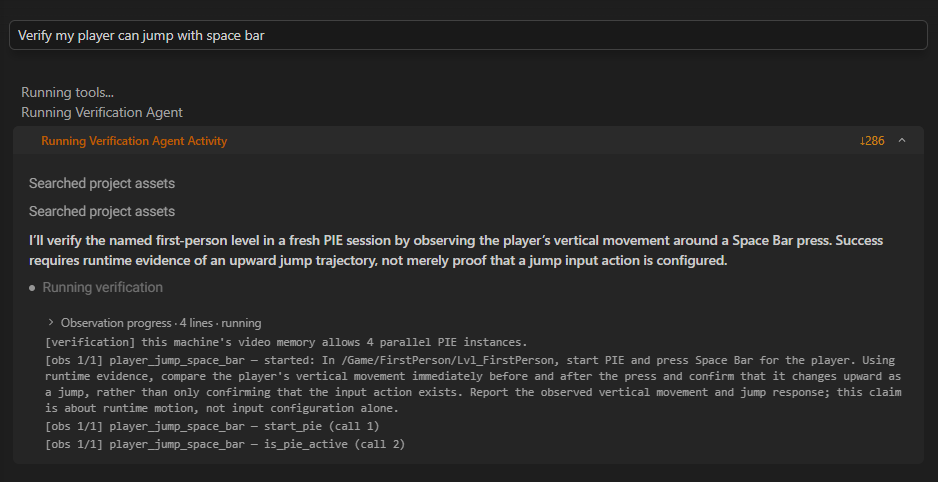
Plans built in Plan mode will often end with a verification step, so pressing Build runs it along with the rest of the work.
💡 Verification is most valuable on gameplay logic with a visible result. Asking Aura to verify a material or a mesh import gives it much less to check.
Workflow Tips
- Ask for the outcome, not the implementation. "The door should open when the player is within 200 units" gives verification a testable condition. "Add a trigger volume" does not.
- Give it a level it can run. Verification needs something playable. On an empty map with no player start, there's nothing to observe.
- Let it finish. A verification run enters PIE, exercises the feature, and exits. Interrupting mid-run loses the evidence for that attempt.
- Read the evidence, not just the verdict. The recorded video often shows a detail that a passing verdict won't mention, like timing, a visual artifact, or an interaction you didn't specify.
Cost
Verification is genuinely more expensive than a plain chat response. It runs the game, captures video, and reasons over the result, sometimes across several attempts.
That's usually a good trade against manually testing the same feature yourself, but it's worth knowing where your credits are going. See How Pricing Works for how usage is calculated.
Current Limitations
We're actively working on improving the Verification Agent. It'll only get better from here!
Needs an observable result
Verification is built around watching something happen. Changes with no runtime signal, like an editor-only utility, a refactor with identical behavior, or an asset naming pass, can't be meaningfully verified by playing the game.
Unity support
Aura for Unity runs a simpler form of verification. It compiles, enters Play mode, and checks screenshots against what you asked for. It currently doesn't support the more advanced features like recording video evidence.